Posts

How to Make Break Nodes in #INFOSWMM and #H2OMAP SWMM
Image
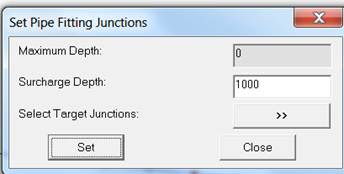
How to Make Break Nodes in #INFOSWMM and #H2OMAP SWMM You would add a break node to break up long force mains so that the pipe(s) react faster to the pump flows. Find your long FM or long  Gravity Main links Insert a Node into the middle of the link to break the link into two links with the same geometry but different lengths Use the Node Inference tool to estimate the new nodes invert based on the immediate upstream and downstream node inverts   If you make a new for a FM, please also use this tool   which will set the Surcharge depth – 1000 is bit high .  Steps used to Insert Nodes in a Force Main

InfoSWMM and the Custom Report Tool

Image
Step 0 is to define the domain and use the Custom tool in Tools, Step 1 is to define the data source Step 2 is to define the fields to show in the table Step 3 is to define the source (click on Domain) and Step 4 is to view the output table.

Larger Fonts in #SWMM5 using Delphi

Image
If you Delphi XE2 to XE7 then it is easy to adjust the Fonts in Fmain.pas using the Respective Property Pages - it does not work for menus, unfortunately.

The Impact of the yCrown Taper equation in #SWMM5 on Surcharged Nodes

Image
The Impact of the yCrown Taper equation in #SWMM5 We are looking at three ranges of depth in the node: 1.  Node depths below yCrown using the node continuity equation to compute the new node depth, 2. Node Depths above 1.25 * yCrown use the point iteration solution for the node in which there is no node area and the program iterates until the sum of flows is zero for the timestep. 3.  Node Depths between yCrown and 1.25 * yCrown use the taper equation in which the node area decreases from the area at 0.96 Full Depth to a value of zero area at 1.25 yCrown. If the current depth in the node is below 1.25 * yCrown Where,  yCrown is the depth till the highest connecting conduit crown elevation There is a tapered equation based on the sum of the  flow at the node and the surface area from the last non-surcharged condition which will influence dqdh if depth close to crown depth F = yLast/yCrown – 1 Denom = Sum DQDH for all connecting links to the node Denom = Denom + (Old ...

Spatial Databases in #InfoSWMM and #InfoSewer using ArcCatalog™

Image
Spatial Databases in #InfoSWMM and #InfoSewer using ArcCatalog™ With ArcCatalog™ , you can explore and manage geographic data stored in an RDBMS through ArcSDE™ . Similarly, SDE for Coverages lets you access coverage, ArcInfo™ LIBRARIAN, and ArcStorm™ databases the same way you access data from an RDBMS. To access these spatial databases, you must add a spatial database connection to the Catalog. Refer to the section on   Database Connections folder -> Spatial Database Connection   link in the ArcGIS help file to learn more.

Pump as a Node In Water and System Head Curve

Image
System Head Curve Note:  This is a feature often asked for in InfoSWMM and SWMM5.  Pumps are links in the SWMM5 engine. The dialog box for system head curve is shown below. Click   here   for the methodology of system head curve. Input for system head curve: •   Flow Unit   – Select the desired flow unit. •   Head Loss Equation   – Select from Manning, Darcy-Weisbach (Colebrook-White), or Hazen–Williams formula. •   Pipe 1   – The pipe that connects the upstream reservoir with the pump (i.e., pipe on the suction side of the pump). •   Pipe 2   – The pipe that connects the pump with the downstream reservoir (i.e., pipe on the discharge side of the pump). •   Coefficient   – Roughness coefficient. •   Head at Position 1   – Head at the upstream reservoir. •   Head at Position 2   – Head at the downstream reservoir. •   Length   – Length of the pipe (i.e., pipe 1 or pipe 2). •  ...

#SWMM6 - A Sustainable Center for Crowd-Sourced Water Infrastructure Modeling

Image
#SWMM6 - A Sustainable Center for Crowd-Sourced Water Infrastructure Modeling https://t.co/3YuI73JSuf pic.twitter.com/iEVrIxCYSH — Robert E Dickinson (@RDickinson) September 26, 2016